Payment orchestration is the technology that helps businesses connect and manage their payment providers and methods from one platform. A business can use it to add supported payment options, set rules for how eligible payments are routed and track what happens across its online payment operations.
For example, an online retailer might work with two banks for card payments and a separate provider for a digital wallet. Payment orchestration gives the retailer one place to configure those connections, review transaction results and manage supported payment operations.
How Does Payment Orchestration Work?
- Connect payment providers. The business completes its commercial arrangements with the providers it wants to use and configures the supported connections through its orchestration platform.
- Send the payment request. When a customer chooses a method at checkout, the platform sends the request through a connection that supports it. If more than one contracted virtual POS is eligible for a card payment, the platform can apply the business’s routing rules.
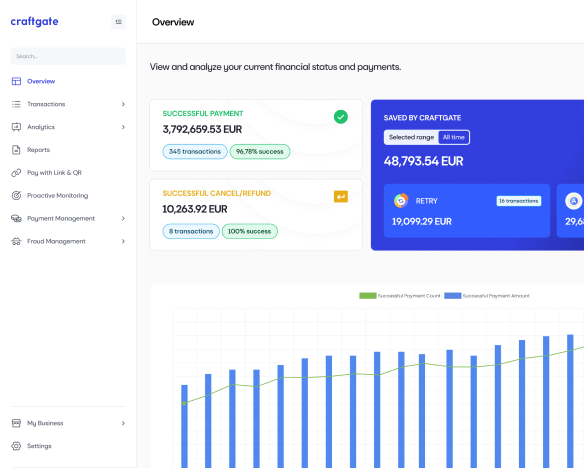
- Track the result. The platform brings transaction statuses and provider details into one view. Teams can review payment outcomes and manage cancellations, refunds and reconciliation for supported flows.
What Is the Difference Between Payment Orchestration and a Payment Gateway?
A payment gateway provides the technical connection that transmits a payment request from a business to its payment provider and returns the result. Payment orchestration can include gateway technology and adds tools to manage connected providers, such as routing, downtime monitoring and reporting.
When comparing products, check which providers you can connect, how routing rules are applied and what your team can see or manage after a payment. The features offered under the term “payment gateway” can vary across products.
Benefits of Payment Orchestration for Online Payments

Keep Payments Moving During Disruptions
With Autopilot enabled, Craftgate monitors for general virtual POS outages and can route incoming payments to an available, eligible alternative. It monitors 3D Secure and non-3D Secure flows separately, so the action can apply to the affected flow.
Payment Retry works at the transaction level. Craftgate classifies errors into groups and automatically retries individual transactions in retry-eligible error groups through a suitable alternative provider the business works with. Both capabilities can help recover payments that might otherwise fail, depending on the issue and the available connections.
Manage Commission Costs With Routing Rules
Commission rates and settlement terms can vary across a business’s virtual POS agreements. With Smart and Dynamic Payment Routing, the business can apply its own rules across eligible, enabled virtual POS connections. For example, it can consider the agreed commission and settlement terms for a particular card type or installment count when it sets its routing priorities.
Analyze Payment Performance From One Place
Using Craftgate’s Advanced Merchant Panel, teams can review approved, declined and pending payments and filter transactions by provider, channel or date range. Comparing periods can help identify a rise in declines or an issue concentrated in one channel. Finance teams can use transaction and provider records to follow refunds and reconcile payments.
Add Payment Methods for Each Market
A single integration can help businesses add supported bank virtual POS connections, alternative payment methods and international payment methods as their needs change. Check the current provider coverage, currencies, eligibility requirements and commercial terms for each market before choosing a payment method.
Make Checkout Easier for Returning Customers
Tokenization lets returning customers use a stored card without re-entering card details when they have opted to save it. A business can also use a closed-loop wallet to offer points or campaign rewards that customers can redeem in its own store or app. Teams can configure fraud management rules according to the risks they see in their payment flows.
Payment Orchestration Examples by Industry

E-commerce
During a sales campaign, an online store can offer saved-card checkout to returning customers and configure an alternative eligible virtual POS for provider downtime. Tracking declines by provider during the campaign helps the team see where to investigate if checkout completion drops.
Retail
An online grocery retailer in Türkiye can offer supported meal cards for eligible baskets. A retailer with a loyalty program can let customers redeem campaign rewards on a later purchase. A retailer that takes orders through a sales team can also use payment links to send customers to an online payment page.
Insurance
An insurer can give customers an online way to pay a policy premium or renewal. If a renewal reminder includes a payment link, the insurer’s team can track whether the customer has completed payment before following up. See how orchestration can support online payments in insurance.
Travel and Tourism
A travel agency or accommodation booking site can show the methods available for a reservation and track the payment result before confirming the booking. A business serving travelers from multiple markets can review which payment methods are available and how cancellations and refunds work for each one. See our guide to payment methods for online reservations.
Cross-Border E-commerce
A business selling abroad can select payment methods that shoppers in its target market already use and decide which currencies to show at checkout. Before launch, check the provider’s coverage, supported currencies and settlement and refund terms. Our global payments guide covers the questions businesses should ask when entering a new market.

How to Get Started With Craftgate Payment Orchestration
Choose the payment methods you need, check which providers Craftgate supports and complete the required commercial steps with the relevant providers. Then configure the connections in Craftgate and activate the methods supported by your integration.
What Should You Check Before Going Live?
Test successful and declined payments, how checkout returns customers to your site and any authentication or alternative routing relevant to your setup. Verify that payment statuses match your order records and that your team can follow refunds and reconciliation for the methods you plan to offer.
Conclusion
Use payment orchestration to connect the methods your customers need, manage how eligible transactions are routed and review results across providers. If you are planning a new integration or adding payment methods to an existing checkout, contact Craftgate to discuss the options for your business.