A virtual POS integration lets a business accept online card payments through a bank or payment provider it works with. As the business adds providers to support new customer groups, countries or installment plans, it also needs a way to decide which connection should handle each eligible payment.
This guide explains how to set up a virtual POS, when a ready integration can help, and how to route payments to a lower-commission virtual POS based on your agreements and transaction requirements.
What Is a Virtual POS?
A virtual POS (virtual point of sale) is the online counterpart of a physical card terminal. It receives card payment requests from a website or app and returns the provider’s response. Businesses can use a bank virtual POS or a card payment service offered by an eligible payment provider.

How to Set Up a Virtual POS Integration
- Choose a provider and complete its merchant onboarding. Discuss the card types, currencies, installments and authentication flows you need. Review commission rates, other fees and when the provider pays out. Application requirements vary. Your provider may ask for company and contact details, product information, delivery and return policies, and evidence that your website uses HTTPS.
- Choose how to connect your checkout. Use the provider’s direct integration or connect through a gateway that already supports the provider. The right approach depends on how many connections you expect to maintain, the payment experience you want and your team’s resources.
- Configure the connection and test the full payment flow. Use the relevant test environment. Test successful and declined transactions, 3D Secure where applicable, and cancellations or refunds. Check that payment statuses match your order records and that your finance team can reconcile transactions against provider reports.
- Activate the production connection and monitor it. Confirm that the selected payment options work in the live checkout. Compare order records with payment results and provider payouts, especially during the first settlement cycles.

Which Virtual POS Integration Is Right for Your Business?
Use your expected monthly payment volume, customer profile and target markets to decide which integrations to prioritize. For each provider, confirm the merchant eligibility rules, supported cards, currencies, installment plans and payout schedule. If you sell in more than one market, verify what the provider can support for your business in each country.
For merchants operating in Türkiye, local bank agreements and card programs can affect the installment options available at checkout. International payment methods may have different eligibility and integration requirements. Start with the methods your customers are likely to need, then verify the commercial and technical coverage of each connection. Online payment methods guide · International Payment Methods
What Is Ready Virtual POS Integration?
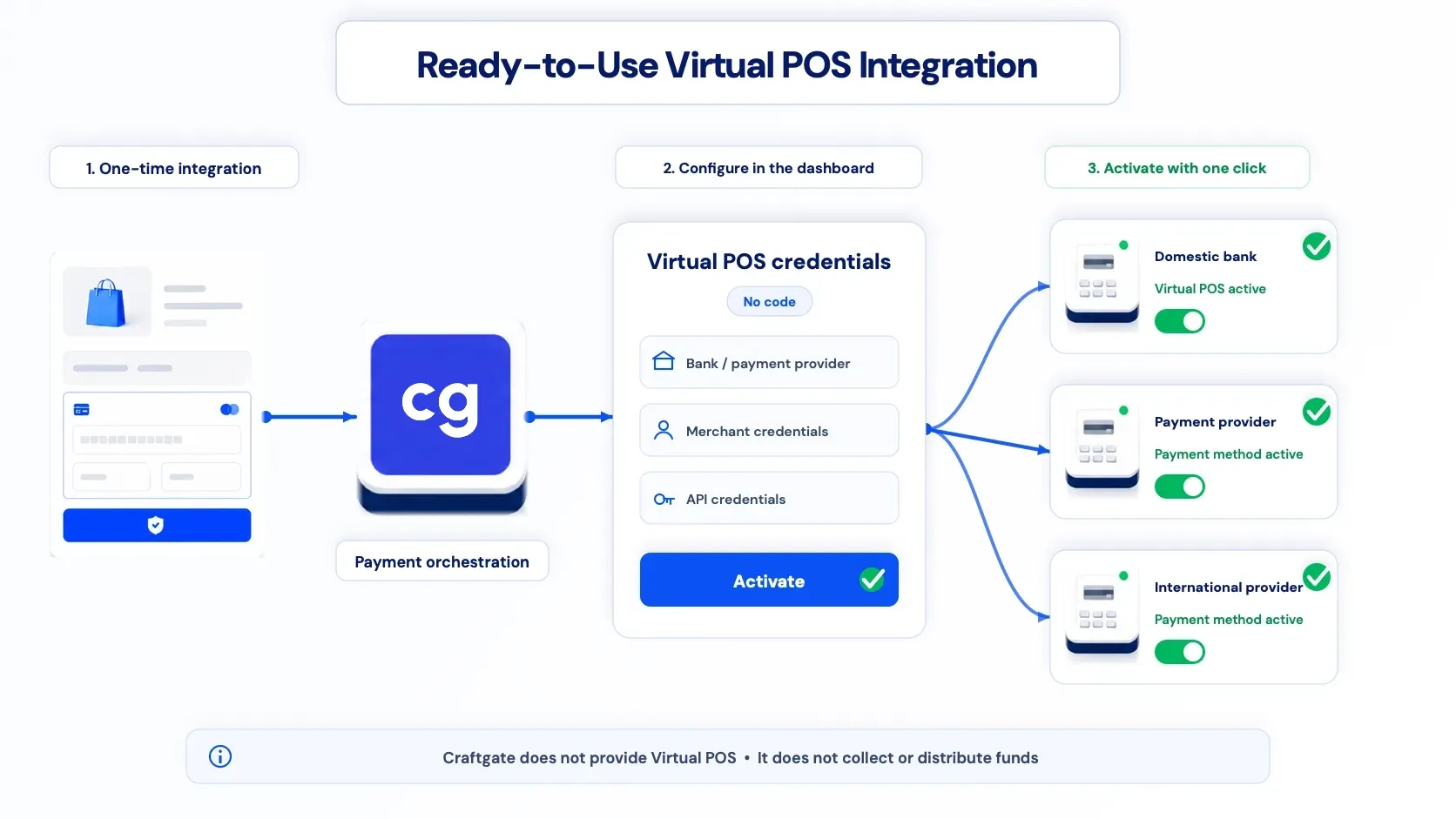
A ready virtual POS integration is an existing connector that a gateway or payment orchestration platform maintains for a supported bank or payment provider. After the merchant completes its agreement and the platform integration, the team can configure the provider connection and test the payment flow using the same technical setup.
A payment gateway connects the checkout to the contracted providers and carries payment requests and responses. A payment orchestration platform can combine gateway connectivity with routing rules, reporting and other checkout tools. Payment gateway guide · Payment orchestration guide
Why Businesses Use Ready Virtual POS Integration
As businesses add providers for new payment methods, card programs or commercial terms, they also take on more integrations to test and maintain. Ready integrations can reduce that workload. Finance and operations teams can also use a shared view of payment results to monitor issues and compare provider costs.
How to Route Payments to the Lowest-Commission Virtual POS
With several contracted providers, start by identifying the connections that can process the requested payment. For example, a transaction may require a particular card program, installment plan, currency or 3D Secure flow. Within the eligible set, compare the fees that apply to the transaction and define which provider to prioritize.

Compare Commission and Total Payment Cost
The commission rate is usually a percentage of the transaction amount. For a like-for-like comparison, check whether each offer includes a fixed fee, extra charges for installments or currency conversion, and any differences in payout timing and refund charges. Apply the terms that match the specific payment and compare your expected transaction mix over time.
For example, on an illustrative TRY 1,000 transaction, a rate of 1.8% plus a TRY 4 fixed fee costs TRY 22. A rate of 2% with no fixed fee costs TRY 20. The example shows how two commercial offers can compare after the transaction fees are added. Check actual rates and charges with your contracted provider. For bank-provided virtual POS terminals in Türkiye, also check the applicable Central Bank of the Republic of Türkiye rules on maximum merchant fees. CBRT maximum merchant commission rates
Set Up Commission-Based Routing
- Map your contracted routes. List the payment and installment combinations each provider can support. Record the contracted rates and other fees for each combination, along with payout timing.
- Connect and test the providers you plan to use. Configure eligible connections in one place. Verify that they can process the transaction types your routing rules will send to them.
- Define the routing rules. Use the commercial terms and parameters relevant to each payment, such as card type, card family, installment count, amount, 3D Secure and time window. For comparable eligible routes, prioritize the route with the lowest applicable commission or total cost, according to your commercial objective.
- Review results against your statements. Check whether transactions go through the intended connections and whether provider statements match your expected costs. Update the rules when agreements, fees or available payment options change.
How Craftgate Supports Virtual POS Integration
Craftgate brings supported connections to contracted bank virtual POS terminals and payment providers into one integration. After the merchant completes the relevant agreements, the team can configure its connections in the Advanced Merchant Panel. The Payment Gateway provides access to those connections, and Smart and Dynamic Payment Routing directs payment requests according to the merchant’s configured rules.
If a configured virtual POS experiences downtime, Autopilot can direct incoming requests to a predefined contracted alternative. Payment Retry acts on individual transactions in retry-eligible error groups and retries them through an eligible alternative contracted provider. Teams can review payment results and provider performance in the panel alongside their cost data.
Depending on your checkout requirements, you can also consider Tokenization for stored-card payments, a Closed Loop Wallet for your own ecosystem, or the Link & QR Payment Solution. Review the integration options and choose the setup that fits the way your customers pay. Craftgate developer resources
Conclusion
Start by defining what your checkout needs, choose the right provider connections, and test them from payment through reconciliation. If you work with several providers, use the applicable commercial terms to define which eligible route should handle each payment. Review costs and results as your transaction mix and agreements change.
Contact the Craftgate team to discuss virtual POS integration and commission-based routing for your business.